< Back     < Back to Playlist tab

• Little Nero

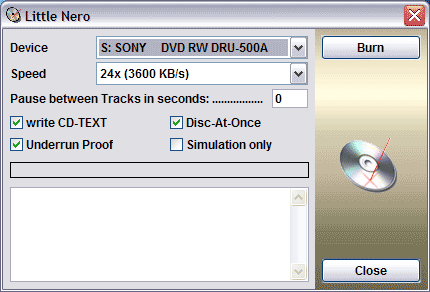
Start Burn of Audio-CD Output Window Burning Progress Bar

Little Nero is an nice Add-On for all Nero users to create an Audio-CD with one Click!
Note: To use Little Nero, a full installation of Nero 6 is required!

Let's have a closer look...

• Device
    Select your CD-Recorder to burn an Audio-CD.

• Speed
    Select burning speed of CD-Recorder with this dropdownlist.

• Pause between Tracks in seconds
    If you want to burn an nonstop Audio-CD enter 0 seconds between the Audio tracks.
    Standard is 2 seconds for normal Audio-CDs.

• write CD-TEXT
    Check this box to write additional CD-Text onto Audio-CD.

• Disc-At-Once
    If not checked, Track-At-Once method is choosen to burn an Audio-CD.

• Underrun Proof
    If checked Underrun proof of CD-Recoder is enabled. (Recommended)

• Simulation only
    If you want to test a burning action, check this box.

< Back     < Back to Playlist tab